Mark notification as read when clicked
IPS 

Mark notification as read when clicked 1.0.1

No permission to download
Short Description
Fixes outdated behavior for popup notifications, ensuring counts update and unread status is marked with a plugin.
1.webp

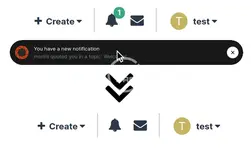
Without this plugin, when you click a popup notification, either at the bottom of the page (toasts) or in the OS (web notifications), you are taken to that item but the count on the notification icon is not updated and the notification remains marked as unread.

This plugin fixes that behaviour, so clicking the popup notification will mark that notification as read - it will no longer show up as bold in the notification list and the notification count will be decremented by one.
  • This plugin doesn't change any other behaviour.
Author
hargrave
Views
374
Extension type
zip
File size
1.5 KB
First release
Last update
Ratings 0.00 star(s) 0 ratings
Link was Broken? Send message to the Website Team and we will assist you quickly!
Support Developer If you are satisfied with the test or your project has earned you money, Click the More Information button to support the developer by purchasing.

More resources from hargrave

Gravity Flow WordPress Plugin H
Implement review loops allowing users to edit their values before re-submitting for approval.
Divi Supreme Pro - Custom and Creative Divi Modules H
Take Divi to the next level. Divi Supreme is a stunning Divi plugin packed with everything you need
JetBlocks - Must-Have Widgets For Creating Headers & Footers Elementor H
Enjoy the easy-to-use widgets made for enriching headers & footers with content.

Similar resources

Notification When Promoting Content Z
This resource will send a notification to the content author when their content is promoted.
Notifications Z
This resource will allow members to send notifications to other members.
Bookmarks N
IPS Bookmarks 2.0.12
Bookmarks is an easy and convenient way to save and bookmark content that you want to find later
Back
Top