Camera Raw Settings [23 Preset]

Camera Raw Settings [23 Preset] 2021-07-25

No permission to download
Short Description
Enhance your images with Photoshop's Camera Raw filter. Load expert settings from our downloadable xmp file to instantly apply professional adjustments. Ready in just a few clicks!
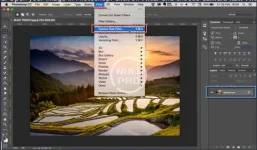
1. Open your image in Photoshop. Click on Filter and choose Camera Raw Filter ...
07202125_85.webp

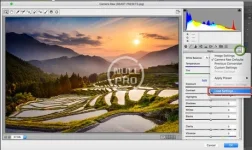
2. Click on the right side of Basic menu (Green Circle). Then, choose Load Settings...
07202125_86.webp

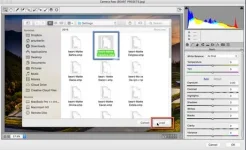
3. Choose .xmp file from downloaded and unzipped folder. Then click on Load button.
07202125_87.webp

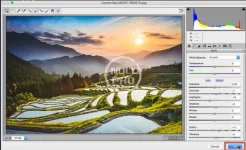
4. To apply effect, click on OK button.
07202125_88.webp
Author
anne
Views
466
First release
Last update
Ratings 0.00 star(s) 0 ratings
Link was Broken? Send message to the Website Team and we will assist you quickly!
Support Developer If you are satisfied with the test or your project has earned you money, Click the More Information button to support the developer by purchasing.

More resources from anne

Chauffeur Taxi Booking System for WordPress A
a powerful limo reservation WordPress plugin for companies of all sizes.
WP-Optimize Pro A
WP-Optimize Pro 4.6.0 Nulled
Get it into shape in seconds with WP-Optimize!
JChatSocial Enterprise A
JChatSocial is the NEW and most advanced live chat and video chat system

Similar resources

25 Moody Portrait Lightroom Presets A
Moody Landscape Lightroom Presets is a powerful Collection of professional Travel Blogger Lightroom
450 Zoodle Hand Drawn Illustrations C
Dive into a world of fun with Zoodle Hand-Drawn Illustrations!
Artistic Collection - Metal Lightroom Preset (Mobile & Desktop) D
The preset is universal and suitable for any kind of photo so you can be free to experiment
Back
Top